
Building a GitHub Backed Pastebin CLI in Go
Why I ditched bloated note apps and built a local first, autosaving terminal editor for my daily snippets.
There is a specific kind of frustration that happens when you are deep in the terminal and just need a place to drop a quick text snippet.
Working as a Senior Software Engineer at ValueLabs, my day usually involves juggling complex distributed systems, tracing logs, and debugging backend logic. When you are knee deep in Python and Django configurations, context switching is the absolute enemy. Opening a bloated web browser to paste a JSON payload or a stack trace into a random web pastebin breaks that flow. It is also a massive privacy risk for proprietary code.
I needed a solution that was fast, lived entirely in the terminal, and securely synced across my machines without requiring a heavy database.
So, I built pb, a personal Pastebin CLI.
The Problem: The Note App Bloat
The modern developer ecosystem is filled with note taking applications. However, they all suffer from the same fundamental flaws when applied to quick developer workflows. They require leaving the terminal environment, they consume massive amounts of system memory, and they lock your data into proprietary formats.
I wanted a system with strict requirements:
Local First: It must work offline and keep a local cache of files.
Autosave: I should never lose a draft if I accidentally close the terminal window.
Version Control: I need a durable history of my snippets to track changes over time.
Secure Storage: It should use infrastructure I already trust and control.
The Solution: Enter Go and GitHub
While my daily professional stack leans heavily into Python and Next.js, I wanted this CLI to be blazingly fast and compiled into a single executable binary. Go was the absolute perfect language for the job.
Instead of spinning up a dedicated AWS RDS instance or a complex database to store simple text files, I realized I already had the ultimate free, version controlled storage backend at my fingertips: GitHub.
The pb CLI leverages the official GitHub CLI tool for secure authentication. When you run the initialization command, it automatically spins up a dedicated private repository called pastebin-cli-store on your personal GitHub account. This repository acts as the secure, hidden backend for all your text snippets.
Sync and Autosave
Building a synced CLI tool is incredibly tricky. You have to handle offline edits, remote conflicts, and local state management seamlessly.
Here is how the architecture handles the flow of data.
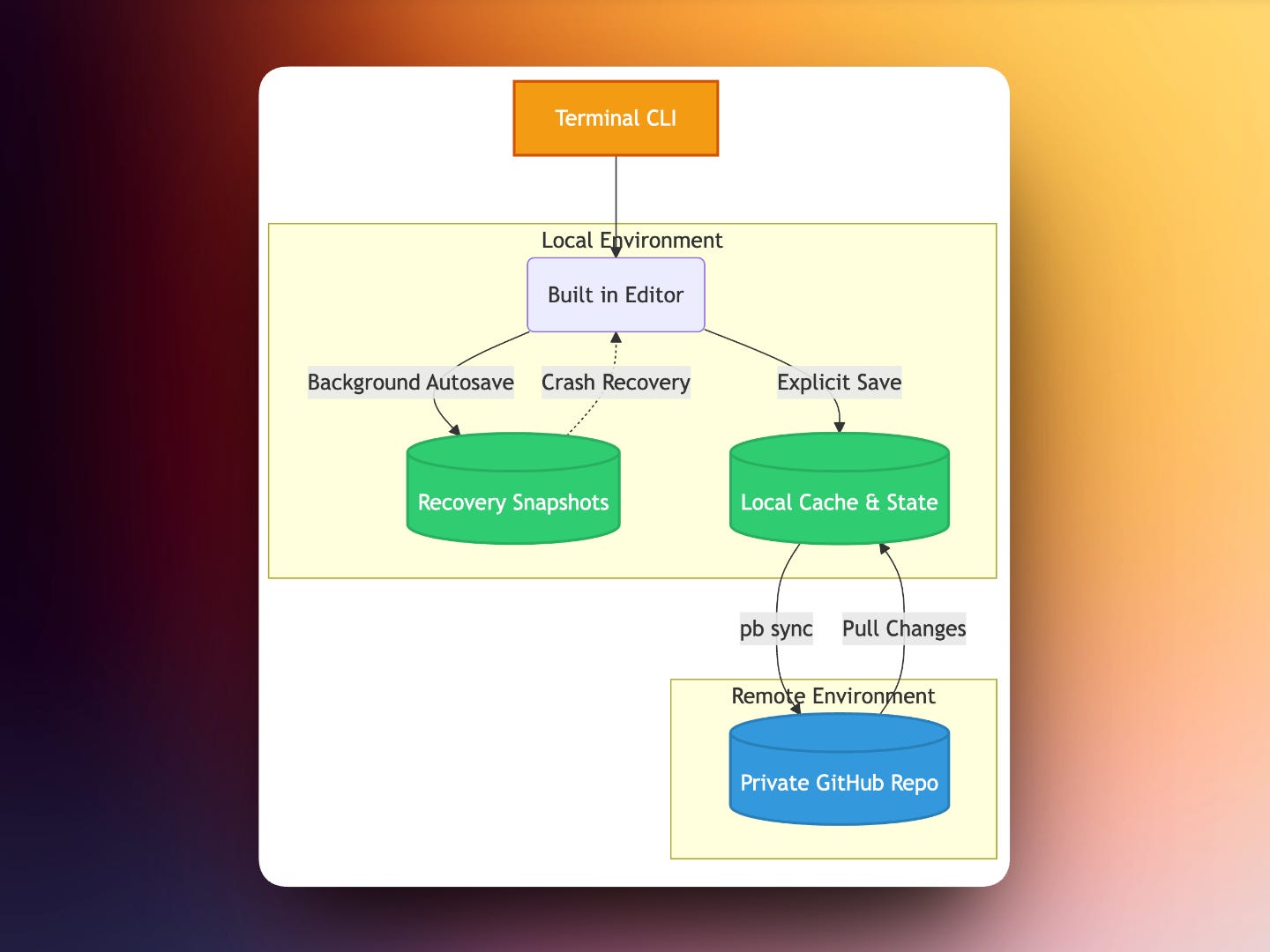
The tool utilises an intelligent local data layout stored safely under the user configuration directory.
State Management: It tracks file metadata and pending operations locally using a journal system.
Recovery: As you type in the built in terminal editor,
pbruns a background autosave. These recovery snapshots protect your local drafts without spamming your GitHub commit history with unnecessary remote versions.Durable Versions: A remote, durable version is only created upon an explicit save or sync command.
If you edit a file on your work laptop and then open it on your home machine, the explicit sync command reconciles the changes. Instead of blindly overwriting data and causing data loss, the CLI safely handles conflicts by creating conflict copies.
Installation and Upgrades
One of the biggest hurdles with internal tooling is distribution. I wanted this to be installable without requiring sudo or administrator rights.
I wrote shell installers for macOS and Linux, and a PowerShell script for Windows. These scripts pull the compiled Go binary directly from the GitHub releases and place it in a user owned bin directory.
To keep the tool updated, I baked in a self upgrading mechanism. The CLI checks GitHub for a newer release approximately once a day. You can set upgrade policies to auto, prompt, or manual, ensuring you are always running the latest version without being forcefully interrupted mid thought.
Final Thoughts
Building pb was an incredible exercise in local first architecture and CLI design. It solved a highly specific itch in my daily workflow. I no longer rely on clunky web apps to store my terminal outputs. I just type pb new notes/today.txt, drop my code, and hit save.
Sometimes, the best tools are not the massive enterprise platforms. They are the small, sharp, highly focused utilities we build for ourselves.
Till next time, happy coding :)